How RuleBindery Works: Documents, Entities and References
How RuleBindery stores a game book: documents for prose, entities for reusable rules, the references between them, the validator, and generated layout.
Last updated 5 min read
RuleBindery stores a game book as structured content. Documents hold the prose. Entities hold the reusable pieces: monsters, spells, items, conditions, random tables and keywords. References connect the two. A validator checks that every reference still points somewhere, and the page layout is generated from the content, so changing a rule never means redoing the layout. This page explains each part and how they fit together.
On this page
Projects, documents and entities
A project is one book. It contains documents and entities, and nothing in one project can reference another project.
A document is a chapter or section of prose: headings, paragraphs, lists, tables, callouts and images. You write it in the editor, or import it from Word or Markdown (Publisher).
An entity is a typed record in the project's Library. Each type has its own fields: a monster has stats, a spell has a level and a casting time, a random table has rows and a die. RuleBindery comes with seven types: Monster, Spell, Item, Condition, Random Table, Keyword and License. You can add your own with New custom type.
The test for which is which: a monster's stat block is an entity; a paragraph about how goblins fight is part of a document. If a thing has the same shape every time and could appear in more than one place, make it an entity.
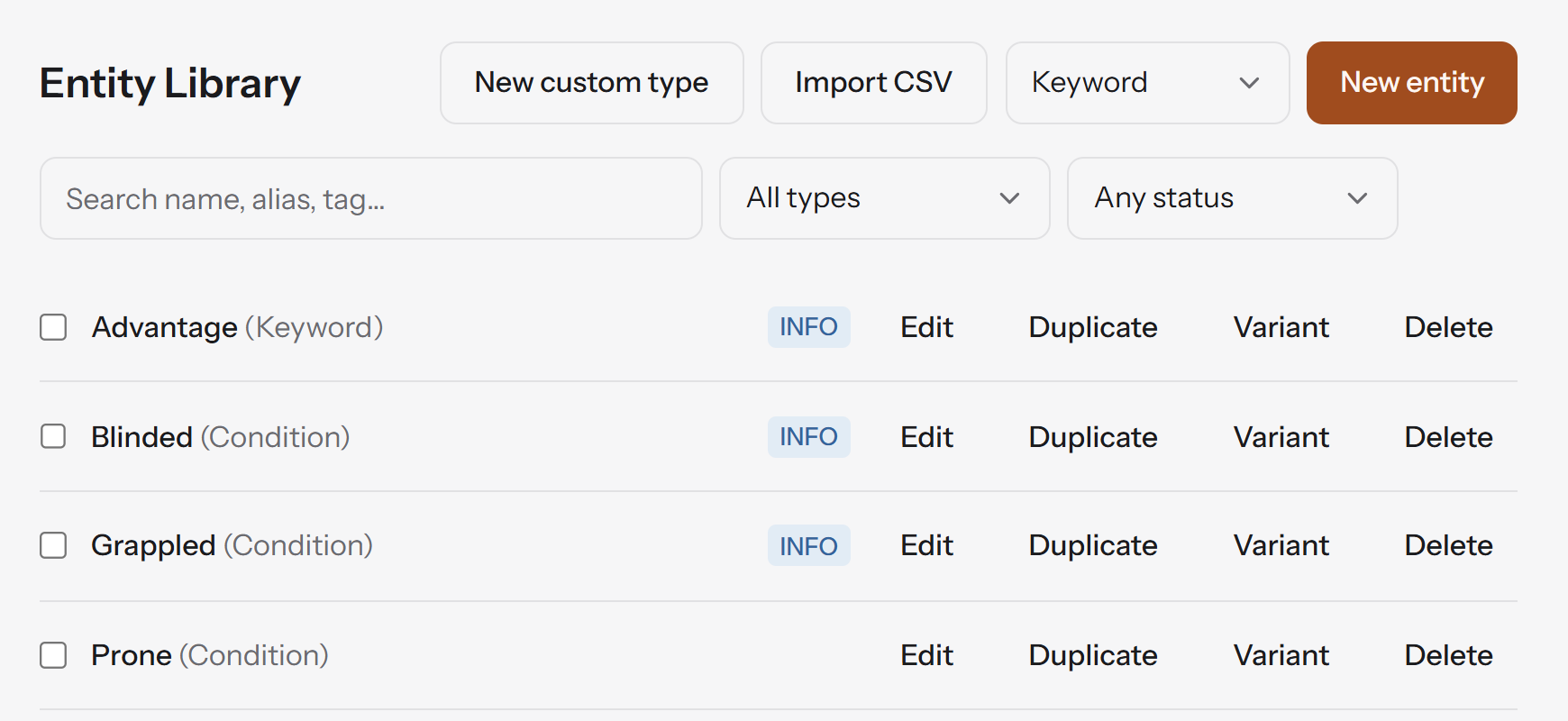
Two Library actions are worth knowing early:
- Duplicate copies an entity as a starting point for a similar one.
- Variant also copies an entity, and records which one it is based on, for a version such as an elite form of a monster. Later edits to the original don't carry over to the variant.
References: link, don't copy
A reference is a link from a document to an entity. There are two kinds:
- An inline reference sits in a sentence. Type
@and part of the name, and it appears as a chip that always shows the entity's current name. - An embed places the whole entity in the document, such as a full stat block. Insert it with Entity embed in the
/menu.
Because a reference is a link rather than a copy, every reference to an entity changes when the entity does. Rename a spell and every chip shows the new name; change a monster's armour class and every embed of it shows the new value.
References are also what RuleBindery uses to build the book's apparatus. The glossary is generated from your keyword entities, and the first use of each term can be set in bold. The Library marks an entity INFO when no document references it yet.
The validator
The validator checks the whole project as you write and lists what it finds on the Issues tab next to the document. Click an issue to jump to it. Every issue has a severity:
- Errors are things that are wrong in the book a reader would get. They include a reference to an entity that no longer exists, two entities with the same name, an entity whose fields don't match its type, a random table whose rows leave a gap, and an image that was never uploaded.
- Warnings are things that are probably wrong. They include a core rules term (such as "advantage") used in prose that no entity defines, two entity names so close they are likely the same thing spelled two ways, a block too large to fit its column, and an image too low-resolution for its size.
- Info notes, such as an entity nothing references yet, are for tidying up.
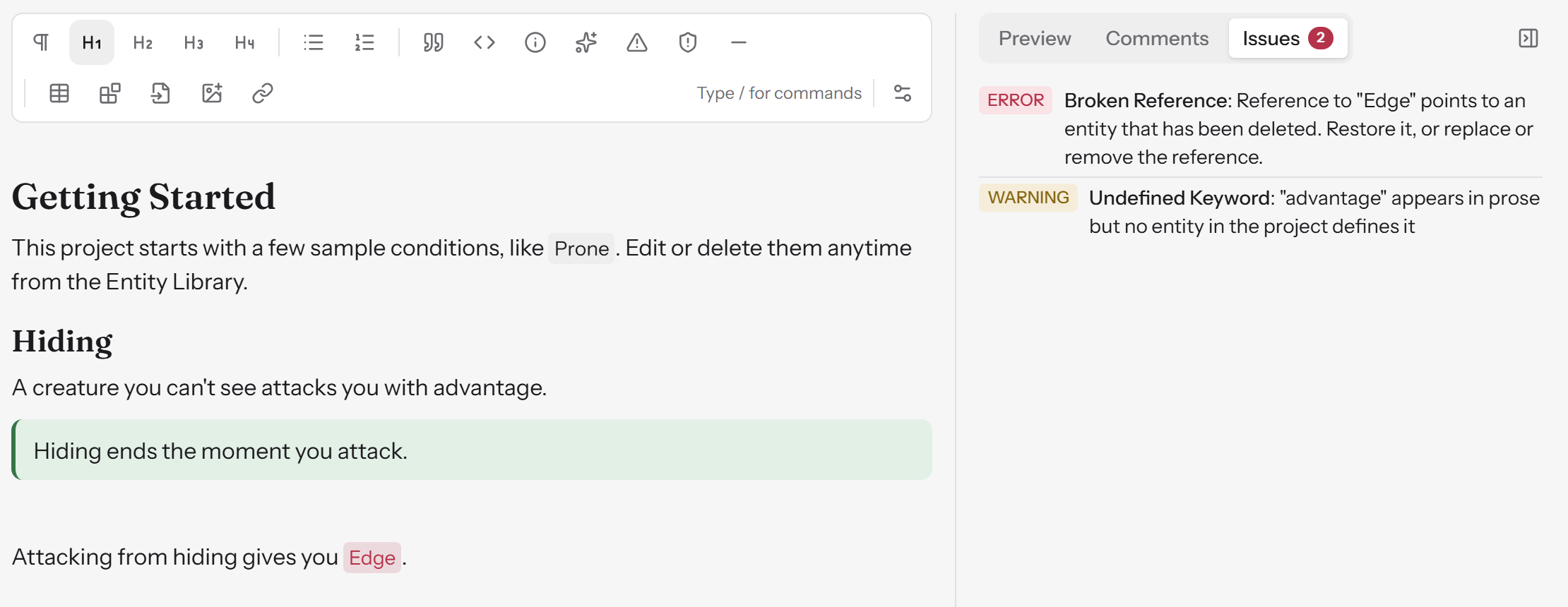
Errors and warnings decide what you can export:
| Export | Blocked by errors? | Blocked by warnings? |
|---|---|---|
| Draft PDF | No | No |
| Screen PDF | Yes | No |
| SRD site | Yes | No |
| Errata document | Yes | No |
| Source Archive | No | No |
So you can always share a draft, but the versions you publish to readers wait until nothing in them is broken.
Layout is generated
You don't place anything on a page. RuleBindery lays the book out from its template: columns, headings, callouts, stat blocks, the table of contents and the glossary. The Preview tab shows the result as you write.
That is why there is no manual page break. A rule added in chapter 2 moves everything after it, and a hand-placed break would then sit in the wrong place. What you control is per section, from Section properties on the toolbar while the cursor is in a heading:
- Page break makes a section start on a new page, or on a right-hand page.
- Page target sets how many pages you want the section to take. The editor shows an estimate against it. It is a target, not a limit: nothing is cut to fit it.
RuleBindery is not a page-layout program. If you want to place every element on every page by hand, a desktop publishing tool does that; RuleBindery is for books where the rules will keep changing and the layout should follow them.
History, snapshots and errata
Every change is saved as you type. To mark a moment you may want to return to, such as "Playtest 2" or "Version 1.0", choose New snapshot on the History page. From there you can:
- Restore a snapshot.
- Tick two snapshots and choose Compare selected to see every change between them.
- Turn that comparison into an errata document listing what changed since the version your readers have (Publisher).
Working with others
You can invite reviewers to a project. They read the book and leave comments on the rules; on Publisher they can also suggest replacement text that you accept or reject. Free includes a few reviewers and Publisher includes unlimited reviewers. Studio adds seats for people who edit, with admin, editor and reviewer roles, and lets you limit freelancers to the projects you share with them. Compare the plans.
What you can take with you
Everything you write stays yours and stays readable outside RuleBindery. The Source Archive export, on every plan, gives you every document as Markdown and every entity as JSON: plain-text files any editor can open. It is never gated, including after a paid plan ends.
Next steps
- Getting started walks through all of this in about 10 minutes on a sample project.
- How to make a TTRPG rulebook covers a whole book, from draft to finished PDF.