How to Make a TTRPG Rulebook: From Draft to Finished PDF
Six steps that take a finished TTRPG draft to a rulebook people can use: structure, edit, lay out, check, export a PDF, and plan for errata.
By Munib Ali LaghariPublished 15 min read
To make a TTRPG rulebook from a finished draft, follow six steps: structure the rules, edit and playtest the text, lay out the pages, check for mistakes, export a PDF readers can navigate, and plan for corrections after release. Most guides we read stop at layout. The last three steps are where books go wrong.
On this page
The six steps at a glance
| Step | What you do | What usually goes wrong |
|---|---|---|
| 1. Structure | Decide the order of sections, and what every spell, monster or item must include | The structure gets invented halfway through layout |
| 2. Edit and playtest | Fix the words with readers who have never met you | Fixes get made on the pages instead of in the text |
| 3. Lay out | Turn the text into pages | Layout starts while the rules are still moving |
| 4. Check | Hunt for broken references, inconsistent names and gaps | Readers find the mistakes instead of you |
| 5. Export | Make a PDF people can search, jump around and read on a tablet | The PDF is a flat stack of pages with no way in |
| 6. Maintain | Version the book and publish corrections | Nobody can say which file is the real one |
We make RuleBindery, so it appears in a few places below. Everything else works with whatever tools you already use.
This guide starts where the writing ends. If you are still working out whether your game is any good, finish that first. The advice below assumes you have a draft you believe in.
What counts as a finished draft?
A finished draft has every rule you plan to ship written down, in your own words, and has been played at least once by someone other than you. It does not need to be polished, illustrated or free of typos.
That second condition matters more than it sounds. A draft nobody else has played is a theory. The first stranger to run it will find the rule you forgot to write, and it is far cheaper to learn that before the pages exist.
Step 1: Give the rules a shape
A rulebook needs an order that matches how people use it: what a new reader needs first, what a returning reader looks up last. Most TTRPG books settle on a short introduction and quick start, then the core rules, then the long lists and tables at the back.
One formatting guide from TTRPG Games suggests six essential sections: a quick start, core rules, character creation, equipment, a game master's guide and appendices. Treat that as a starting point, not a law. Your game may fold two of them together or need one that nobody else has.
Three decisions are worth making now, while changing them is free.
1. Decide the order, and write it down. A board game guide on Meeple Mountain gives the advice to pick an organizing structure and outline it at the top of your draft, then delete the outline from the final version. It was written for board games, and it works just as well for an RPG. If you want an outline to start from, our TTRPG rulebook template is a free 14-chapter one, with the reason for each chapter's place.
2. Decide what every repeated thing must contain. If your book will have forty spells, settle the boxes each one fills in before you write the forty-first: name, range, duration, effect. A list of spells with the same boxes can be laid out, indexed and corrected. A list written differently each time has to be done by hand, forever. Our guide on how to design a stat block works through this for creatures, with a spec you can copy.
3. Pick one word for each idea and keep it. If "Stunned" means something specific, do not call it "Dazed" on page 90. The same Meeple Mountain guide puts it simply: decide which term you will use, then use it everywhere.
Use real headings. In Word or Google Docs, that means applying the built-in Heading styles rather than making text big and bold. It looks identical on screen. But software can only find a chapter title if it has been told that it is one. Word, for example, builds a PDF's bookmarks from its Heading styles, and an import into any layout tool is far cleaner when the headings are real.
Where structure goes wrong
The structure gets decided by accident, during layout, because a page happened to fill up. Then a chapter moves and every cross-reference moves with it.
How RuleBindery handles structure
To see what the structural step looks like in practice, we imported a short spell chapter, written as plain Markdown, on October 13, 2026. RuleBindery noticed that four headings repeated at the same level and offered to turn them into spells. (It calls an entry like a spell an "entity". You can think of it as one card in the book's card index.)
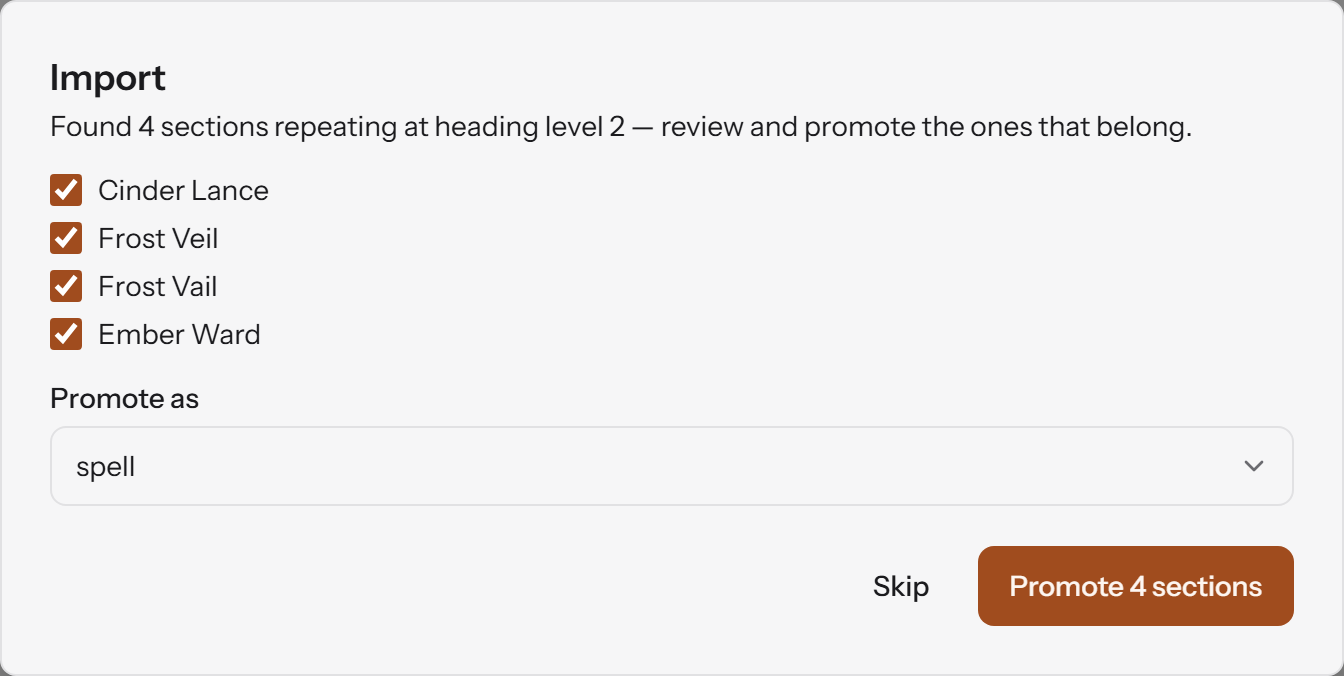
It only proposes: nothing becomes an entry until you click Promote. Importing a draft from Word or Markdown is part of the Publisher plan; the pricing page lists what each plan includes.
Step 2: Edit and playtest the words, not the pages
Edit and playtest the text before you lay anything out, because every change after layout costs more. The aim of this step is a manuscript where a stranger can run the game from the book alone.
Hire or recruit an editor. The designer behind the newsletter Kurt Makes Weird Games is blunt about it. In his March 2026 guide to creating a TTRPG, he writes: "Trust me when I say that an editor is the most important person who will ever touch your game." An editor reads your rules the way a player will, which you no longer can.
Run blind playtests. A blind playtest means the players have never seen your game and have only the written rules and the components. Meeple Mountain's guide says that you should run at least one, preferably two or three, and calls blind playtesting the final stage of writing a rulebook. Again, that advice comes from board games. The reasoning carries over: you are no longer testing the game, you are testing the document.
Watch more than you listen. The same Kurt Makes Weird Games guide argues that what players felt during play tells you more than what they say afterwards. A table going quiet over a rule is data. So is someone turning a page back and forth.
Keep every fix in the text. This is the habit that saves the most time later. Once layout exists, it is tempting to patch a number on the page. Do it in the manuscript, then carry it to the page. (Our post on why one rule change breaks a finished layout explains what the alternative costs.)
Our rule of thumb: do not start layout until one group who had never met you has played from the text alone, and nobody had to ask what a rule meant.
Where editing goes wrong
Feedback arrives in five places: chat threads, emails, a spreadsheet, margin comments and a voice note. Nobody can tell which comment was about which rule, and the comment that mattered is the one that got lost.
How RuleBindery handles review
You can give playtesters a watermarked draft PDF. The export screen describes it as "watermarked, fast, for internal review." Reviewers can comment on your rules in the app too, and the Free plan includes up to three of them.
Step 3: Lay out the pages
Laying out a rulebook means choosing a page size, a column layout and a handful of text styles, then letting the text flow through them. The goal is a book that is easy to scan, because people hunt through a rulebook in the middle of a game more than they read it.
You only need to decide a few things up front:
- Page size and columns. Pick one and keep it.
- A short list of text styles. A chapter title, a section title, body text, a sidebar and a table style cover most of a rulebook.
- A comfortable line length. The Baymard Institute, which studies reading on screens, recommends 50 to 75 characters per line for body text. Its tests found that very long lines made readers tired and more likely to give up. Two columns on a page usually land in that range without any effort.
- Related rules on the same spread. Do not let a stat block split across two pages if you can help it. A reader who has to turn the page mid-fight is a reader who stops using your book at the table.
Consistency beats cleverness. Kurt's guide says it in one line: "Above all, you want to be consistent."
Which tool you use matters less than when you start. Our comparison of TTRPG layout software goes through the main options, including the free ones, and says which one we would pick for most people.
Where layout goes wrong
Layout starts while the rules are still moving. Each change then becomes a small layout job: find every copy, fix each one, check what shifted, update the page numbers. It can feel as though the book will never hold still long enough to finish.
How RuleBindery handles layout
RuleBindery builds the pages from your entries, so there is nothing to place by hand, and that is also its limit. If the look of each spread is the point of your book, a page-design app like Affinity or InDesign gives you control that RuleBindery deliberately does not.
Step 4: Check the book like a stranger would
Before you export, check the finished book for mistakes the way a stranger would hit them: a reference that goes nowhere, a name spelled two ways, a table with a number missing. This is the step most guides skip, and it is where a rulebook earns its reputation.
You can do all of these by hand. They are tedious, which is why they get skipped.
- Names match everywhere. Search for each spell, monster and term. Look for near-misses as well as exact matches, because "Frost Veil" and "Frost Vail" will not turn up in the same search.
- Every "see page" lands on the right page. Typed page numbers are the first thing to go wrong when text moves. Use your app's cross-reference feature where it has one.
- Every special term is explained. Read the book as if it were your first time with it. Any capitalised word you have not defined is a question you are about to receive by email.
- Every table covers every result. A random table for a d100 that jumps from 66 to 70 leaves three results that can never come up. Roll through each table once, top to bottom.
- A number repeated in two places agrees with itself. Damage in the spell entry, in the quick-reference chart and in the example of play should all match.
- Nothing spills. Flip through the pages looking for a heading stranded at the bottom of a page, or a stat block cut in half.
What a tool can and cannot catch
A checking tool is good at the mechanical items: references, names, repeats, gaps. It cannot tell you that a rule is unclear, a spell is too strong or a sentence is clumsy. That is still your editor's job, and the reason Step 2 comes first.
We ran two of these checks in RuleBindery on the same sample chapter. First, we put a reference to a spell that does not exist in the chapter (cinder-lanse, a typo of cinder-lance), the kind of slip that survives a proofread. Then we tried to export a Screen PDF.
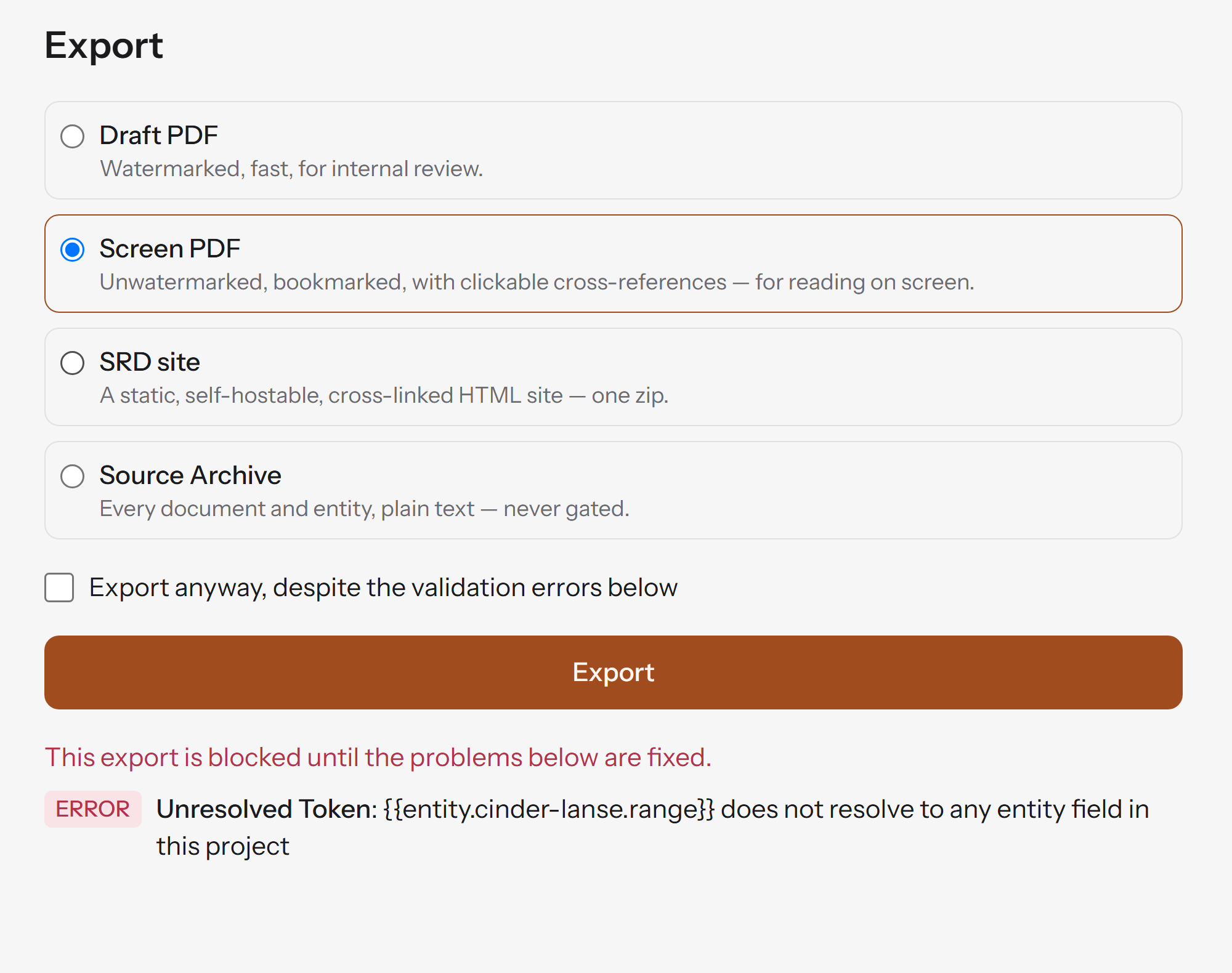
The export was refused until the reference was fixed. There is an "Export anyway" checkbox for the times you need a file now, so the check is a warning you can overrule, not a lock.
The second check was the near-miss from the list above. When the four spells became entries, RuleBindery flagged the pair with the typo.
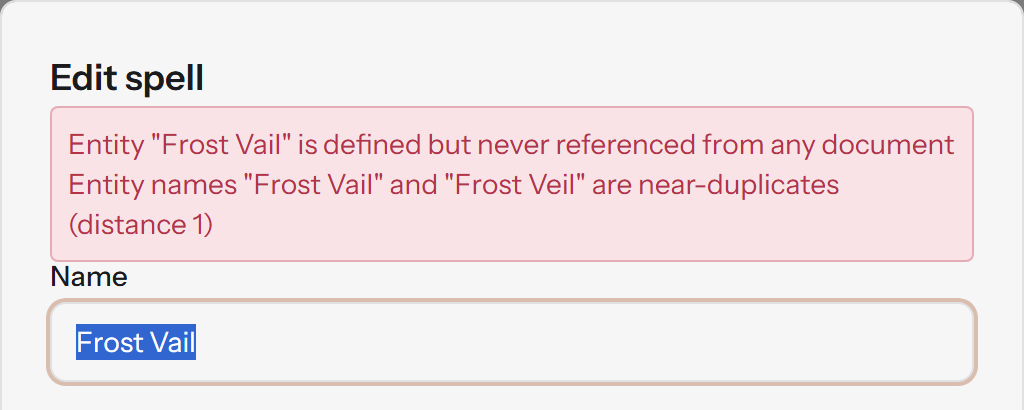
Both messages are the sort of mistake that normally reaches a reader first.
Step 5: Export a PDF people can use
A PDF people can use has bookmarks, working links, real text and a readable size. A PDF made of flat page images looks the same on screen and is far worse to use. Readers cannot jump to a chapter, search for a rule or copy a line into their notes.
Open any PDF you are about to publish and run through this list:
- Bookmarks. Open the bookmarks panel in your PDF reader. If it is empty, the file has no way in. In 2011, the RPG blogger Tenkar wrote that bookmarks are "a necessary feature for any PDF over 30 odd pages", and a rulebook is usually well past that. In Word, this is the Create bookmarks using: Headings option when you save as PDF.
- Clickable contents and cross-references. Click five of them. Every "see page" in the file should take you there.
- Searchable text. Search for a rule name. If nothing is found, the pages are images.
- A readable size. Open it on a phone and on a tablet. Small print and cramped columns that were fine on a monitor often are not.
- Enough contrast. The web accessibility standard asks for a contrast ratio of at least 4.5 to 1 between normal text and its background. It was written for websites, but it is a sensible target for a PDF, and light grey text on cream fails it quickly.
- Screen reader support. Word's save-as-PDF screen has a "Document structure tags for accessibility" option that helps screen-reading software. Tick it. Whatever tool you use, check what its export does.
- A clear file name. Put the title and the version in it. Kurt's guide asks you to name files clearly with the game's title and the version the reader is downloading, so a buyer can tell at a glance whether they have the current one.
Where exporting goes wrong
The PDF is exported at the very end, at the deadline, and nobody opens the bookmarks panel until a reviewer says there isn't one.
How RuleBindery handles PDFs
RuleBindery has two PDFs. The draft PDF is watermarked and meant for review, and it is part of the Free plan. The Screen PDF is described in the app as "unwatermarked, bookmarked, with clickable cross-references — for reading on screen", and it is part of the Publisher plan. The same plan exports your rules as an HTML SRD too; our guide to what an SRD is explains when a game needs one.
Step 6: Plan for the corrections that come after release
A rulebook is not finished when it is published. Readers find mistakes, designers change their minds, and the book needs a way to say which version it is. Plan for that now and it takes an afternoon. Plan for it later and it can take a month.
Four habits do most of the work:
- Number your versions. Pick a scheme and stick to it. Something like 0.7 for playtests, 1.0 for the first release and 1.0.1 for corrections is easy to explain to readers.
- Keep a change log from the first playtest. One line per change, with the date. It is the only honest record of what moved between versions, and it becomes your errata.
- Publish errata as a list, not a rewrite. For each correction, give the section, what it said, what it should say and which version fixes it. A reader should be able to patch their copy in a minute.
- Keep one place where the current file lives, and put the version number in the file name (see Step 5) so a reader who already owns the book can tell the new file from the old.
Where maintenance goes wrong
The correction is made in the layout file and not in the manuscript, or the other way round. Months later, nobody can say which file is the real one.
How RuleBindery handles versions and errata
You can save a named snapshot of the book at any point, compare two snapshots in plain language, and on the Publisher plan build an errata document from the difference. Our post on what happens when a rule changes shows that comparison screen from a real run.
Do you need special software to make a rulebook?
No. Plenty of good rulebooks are made in a word processor and a free layout app, and that is the right setup for many designers. Affinity is free for individuals, Google Docs and Word cost nothing to start, and The Homebrewery is free for D&D-style homebrew (how it compares with GM Binder).
What changes with the size and age of the book is how much of Steps 4 to 6 you do by hand. A short zine with settled rules needs very little. A long rulebook that will keep getting patched is where a tool that builds the pages from your entries, and checks them for you, pays for itself. We think RuleBindery is the right pick in that second case. It is not the right pick if you want to place every element yourself.
If your rules will keep changing, you can write and structure a book in RuleBindery for free and run the same checks on your own text. Our Getting started guide walks through the app in about 10 minutes.
One page to copy: the rulebook checklist
Paste this into your own notes and tick it off as you go.
- Structure: section order decided; fields for every repeated entry decided; one word chosen for each key term; real heading styles used.
- Editing: an editor has read it; at least one blind playtest done, preferably two or three; fixes made in the manuscript.
- Layout: page size and text styles chosen; line length in a comfortable range; related rules kept together.
- Checks: names consistent; every cross-reference lands; every term defined; every table covers every result; repeated numbers agree.
- PDF: bookmarks present; links work; text is searchable; readable on a phone and a tablet; contrast checked; file name carries title and version.
- After release: version scheme chosen; change log started; errata format ready; one home for the current file.
Frequently asked questions
What should a TTRPG rulebook include?
At minimum: an introduction that says what the game is, a quick start, the core rules, the character or play options, guidance for whoever runs the game, reference tables and a way to navigate, meaning a contents page and ideally an index. How you divide those into chapters depends on the game.
How do I write a TTRPG rulebook?
This guide starts after the first draft. For the writing itself, the March 2026 guide from Kurt Makes Weird Games is a good place to begin, and Meeple Mountain's rulebook-writing rules are written for board games but translate well. Draft, test, then use the six steps above.
How many playtests do I need before I lay out the book?
There is no magic number. Meeple Mountain's advice for rulebooks is at least one blind playtest, and preferably two or three. We would add a condition in place of a count: stop when a new group can play from the text without asking you what a rule means.
Can I make a TTRPG rulebook for free?
Yes. Write in Google Docs or Word, lay it out in a free app such as Affinity, and use the checks in Step 4 by hand. RuleBindery's Free plan covers writing and structuring a book, its checks, and a watermarked draft PDF. Our layout software comparison lists the free options and their limits.
Do I need an editor?
You need someone who is not you to read it. A professional editor is best, and a careful friend who has never played the game is a good second. In Kurt's words, an editor is the most important person who will ever touch your game.