Homebrewery vs GM Binder: Which to Use, and When to Move On
The Homebrewery is free with no paid tier. GM Binder keeps variables and credit-free PDFs for its Plus plan. A hands-on comparison, and the signs you've outgrown both.
By Munib Ali LaghariPublished Updated 11 min read
Disclosure: we make RuleBindery, one of the tools covered in this post.
For most homebrew, use The Homebrewery. It is free, open source, has no paid tier, and gives you variables and a PDF without a credits page at no cost. Choose GM Binder if you prefer its editor and folder library, and expect to pay USD 6.00 a month to remove its credits page. Both leave page breaks to you.
On this page
We built the same short rules section in The Homebrewery, changed one rule the way playtesting does, and watched what happened to the page. GM Binder will not open its editor without an account, so its side of this comparison comes from its own plans page, guides and terms. We make RuleBindery, which competes with both for longer books whose rules keep changing. It appears in one row of the table below and in the last section.
The short answer
| If this is you | Use | Why |
|---|---|---|
| You want everything free, for good | The Homebrewery | It has no paid tier, and its makers say it never will |
| You want to try it before making an account | The Homebrewery | Its editor opens without signing in; you need an account only to save |
| You like GM Binder's editor, folders and public profile | GM Binder (Basic) | The free plan covers writing, sharing and a web-quality PDF |
| You need variables, bookmarks or a choice of themes in GM Binder | GM Binder Plus | Those are paid features there |
| Your book is long and its rules keep changing | A tool that lays out pages for you, such as RuleBindery (ours) | Both make you re-check page breaks by hand after every change |
Homebrewery vs GM Binder at a glance
Checked on October 28, 2026, against each tool's own pages.
| The Homebrewery | GM Binder | |
|---|---|---|
| Cost | Free | Basic is free; Plus is USD 60 a year or USD 6.00 a month |
| Run by | Volunteers; the code is open source under the MIT licence | We Write Code, a company |
| Account needed to edit | No; only to save | Yes |
| Where your files live | Homebrewery's storage or your own Google Drive | Your GM Binder library, with folders |
| Page breaks | You type \page |
You type \pagebreak or \pagebreakNum |
| Variables | Yes, free | Plus only |
| Themes | A 5e-style theme, a blank theme, and any brew you import as a theme | Several built in, on Plus |
| Through your browser's print dialog | Basic: web quality, with a GM Binder credits page. Plus: higher quality, credits page optional | |
| Browser | Chrome only, by its own FAQ | Most modern browsers, best in Chrome |
How we compared them
The Homebrewery was tested hands-on in Chrome on October 28, 2026, on version 3.24.2. We wrote a two-page rules section with a creature stat block, made a playtest change to it, and recorded the result. The test is described below, so you can repeat it.
GM Binder redirects every editor address to its login page. We did not create an account, so nothing in this post claims to have used GM Binder's editor. Its facts come from its plans page, its own guide to migrating from Homebrewery, and its terms of service. Where we say what we expect GM Binder to do, it is labelled as our expectation.
What is The Homebrewery?
The Homebrewery is a free, open-source web app for writing tabletop RPG material in Markdown, a simple way of formatting plain text, and seeing it laid out as pages styled like fifth edition D&D books. It is run by volunteers under the NaturalCrit name, and its source code is public on GitHub.
You type on the left and the pages build on the right. Menus insert ready-made pieces such as stat blocks, class tables, cover pages and licence notices. A document is called a brew. Public brews can be browsed in the Vault, its search page.
The Homebrewery is actively maintained. Its changelog shows version 3.24 on September 29, 2026 and a fix release, 3.24.2, on October 20. Recent changes include a warning on unsaved new brews and share pages that update as the brew changes.
What is GM Binder?
GM Binder is a web app for writing tabletop RPG documents in Markdown, with a live preview styled after fifth edition D&D books, a library you can sort into folders, and a public publisher profile. It is run by a company, We Write Code, according to its terms of service.
GM Binder grew out of the same idea as The Homebrewery. Its migration guide says many of its styles came from Homebrewery. In 2019 a Kickstarter campaign to develop it raised USD 54,002 from 728 backers. The paid tier, GM Binder Plus, went live in July 2020, and its launch update priced a year at USD 60, the same as today.
Is Homebrewery or GM Binder free?
Both are free to start. Only GM Binder has a paid tier.
The Homebrewery's welcome page says the tool "will always be free, never have ads," and that its makers "will never offer any 'premium' features." It is funded by donations through Patreon.
GM Binder's free plan is called Basic. According to its plans page, Basic covers the editor, the live preview, folders, a public profile and a web-quality PDF. GM Binder Plus adds:
- a larger, higher-quality PDF
- the option to leave out GM Binder's credits page from a PDF
- document variables
- Binders, which group documents together
- bookmarks
- control over when the preview redraws
- a choice of built-in themes
If you only want to share a link with your group, Basic is enough. If you want to hand out a PDF without GM Binder's credits page, you need Plus.
Where they differ in practice
Accounts and saving
The Homebrewery lets you start writing at once. A new brew lives in your browser until you save it, and saving needs a NaturalCrit account or a Google sign-in. You then choose whether brews are stored by The Homebrewery or in a folder on your own Google Drive.
The Homebrewery's FAQ describes two safety nets. A history button restores versions of a brew up to a week old, but those copies are kept in your browser, so they vanish if you clear its data or change computers. The volunteers also keep daily database backups for eight days and can restore a lost brew on request.
GM Binder needs an account before you write anything. Its plans page does not list version history as a feature of either plan.
Page breaks and columns
Both tools make you decide where each page ends. The Homebrewery's FAQ says it is "currently not possible to flow content" from one page into the next, because each page is a separate box. You type \page to start a new one. GM Binder works the same way with \pagebreak, or \pagebreakNum to add a page number.
Columns are easier. In both tools text fills the first column and carries on into the second by itself, and a column-break command (\column in Homebrewery, \columnbreak in GM Binder) forces a new column early.
Variables
A variable is a named value you write once and reuse, such as a creature's hit points. In The Homebrewery you define one on its own line, as [houndHP]: 22, and write $[houndHP] wherever the number should appear. It also does arithmetic: $[houndHP * 3] prints 66. Change the definition and every use follows.
GM Binder lists "document variables" as a Plus feature, so on the free plan a repeated number is retyped by hand.
PDFs
The Homebrewery's "Get PDF" button opens your browser's print dialog, where you choose "Save as PDF". Its instructions say to use Chrome, match the paper size to the brew, and turn on background graphics. There is no credits page.
On a GM Binder share page, the "Print / Generate PDF" button also opened the browser's print dialog when we tried it logged out. The rendered PDFs on its plans page are an account feature, web quality with a credits page on Basic.
Moving a brew from Homebrewery to GM Binder
GM Binder's migration guide says a Homebrewery brew mostly pastes straight in, then lists the fixes:
- Replace each
\pagewith\pagebreak(or\pagebreakNum). - Replace the empty code blocks people use to push text down a column with
\columnbreak. - In tables built from quoted blocks, put a
>on the blank lines inside them, or the table falls apart. - Leave a blank line above and below each heading.
- Recheck anything positioned with CSS, because the two tools' base styles differ slightly.
Going the other way means reversing the same list.
What happens when a rule changes
In The Homebrewery, a playtest change that makes a stat block taller can cut off text further down the page, without a warning. That is what happened in our test.
- We wrote a two-page section for a marsh setting: travel rules, a hazards table, and a stat block for a creature called the Ashfall Hound, followed by two short sections of rules text.
- Page 1 was full, with a few lines spare at the bottom of the second column. The hound's hit points were a variable, so the total on page 2 could reuse them.
- Then we made a typical playtest change: one new trait, one new action, and hit points raised from 22 to 27.
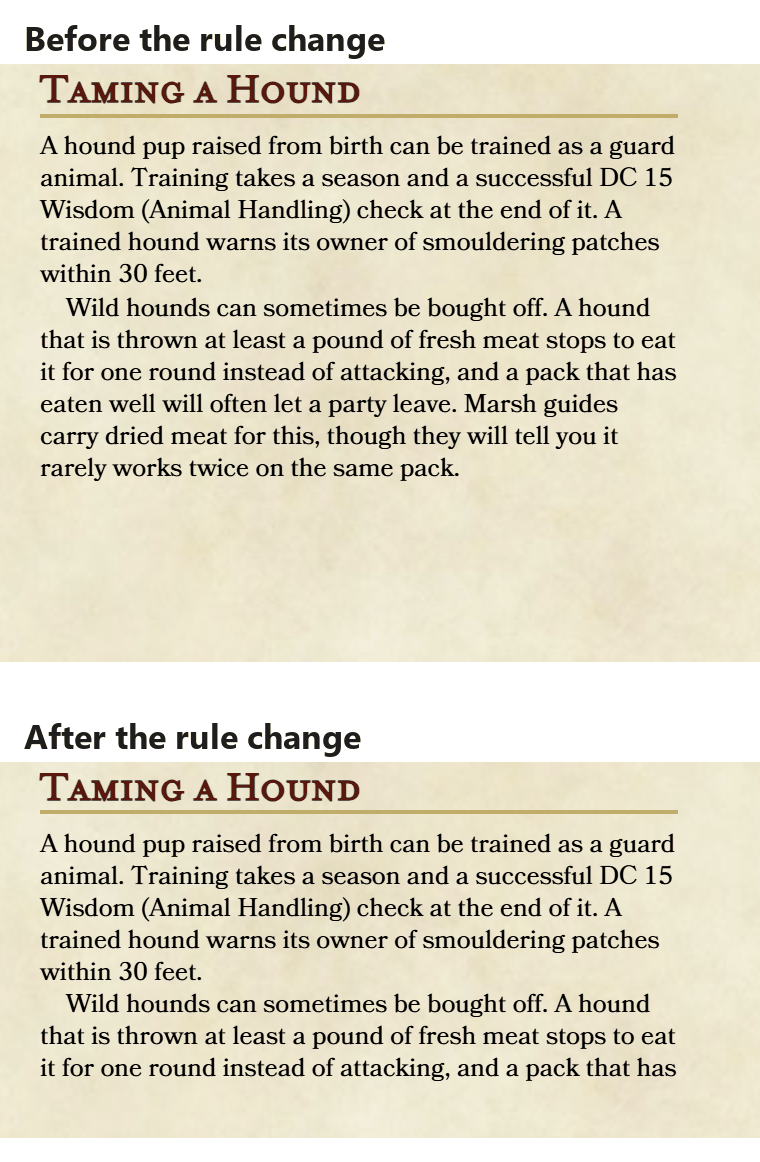
The stat block grew, the text below it moved down, and the last paragraph on the page now stops mid-sentence. The rest went into a third column beyond the edge of the page, which the page hides. The editor showed no warning, and the page count stayed at two. You only find out by reading the page.
The variable did its job: the hit points changed in one place and updated in the stat block. One quirk is worth knowing. Straight after a large paste, the preview showed $[houndHP * 3] as raw text on page 2 until we edited the first page or reloaded. The finished brew was correct.
The Homebrewery's FAQ gives the honest workaround: leave a line or two of space at the end of each column. After a bigger change, you move the cut-off text yourself and check every page after it.
We could not run this test in GM Binder. Its guide also has you place every page break by hand, so we would expect the same kind of check after a change, but we have not confirmed how it handles text that overflows a page.
For a one-shot, this is a few minutes of tidying. For a 60-page book that is still being playtested, it happens after every round of changes. We walk through the same problem in a page-design app in why one rule change breaks a finished layout.
When you've outgrown both
You have outgrown Homebrewery and GM Binder when re-checking page breaks takes longer than writing the change, or when you need something they were not built for. The common signs:
- The book runs to dozens of pages, and a change on page 5 means re-checking every page after it.
- The rules are still changing after the pages look finished.
- The same creature or spell appears in several places, and you keep the copies in step by hand. (Homebrewery's variables help with single numbers, not whole stat blocks.)
- You need to publish corrections to a released book, or a web version of your rules such as an SRD.
- The game is not D&D-shaped, and you are fighting the 5e look.
Where to go next depends on which of those hurts. If you want full control of every page, a page-design app such as Affinity, which is free, is the usual step up; our comparison of TTRPG layout software covers the options. If you are comfortable with code, Typst builds pages from text and reflows on every change. If the problem is rules that keep changing, a structured tool is built for that. RuleBindery, which we make, is one, and the next section runs it on the same brew.
Moving a Homebrewery brew into RuleBindery
This section is about our own product, so weigh it accordingly.
RuleBindery stores rules as structured records and lays out the pages itself, so text that no longer fits moves to the next page instead of being cut off. We imported the Markdown of the test brew above, after the rule change. To get a brew's Markdown, copy everything in The Homebrewery's editor into a text file ending in .md.
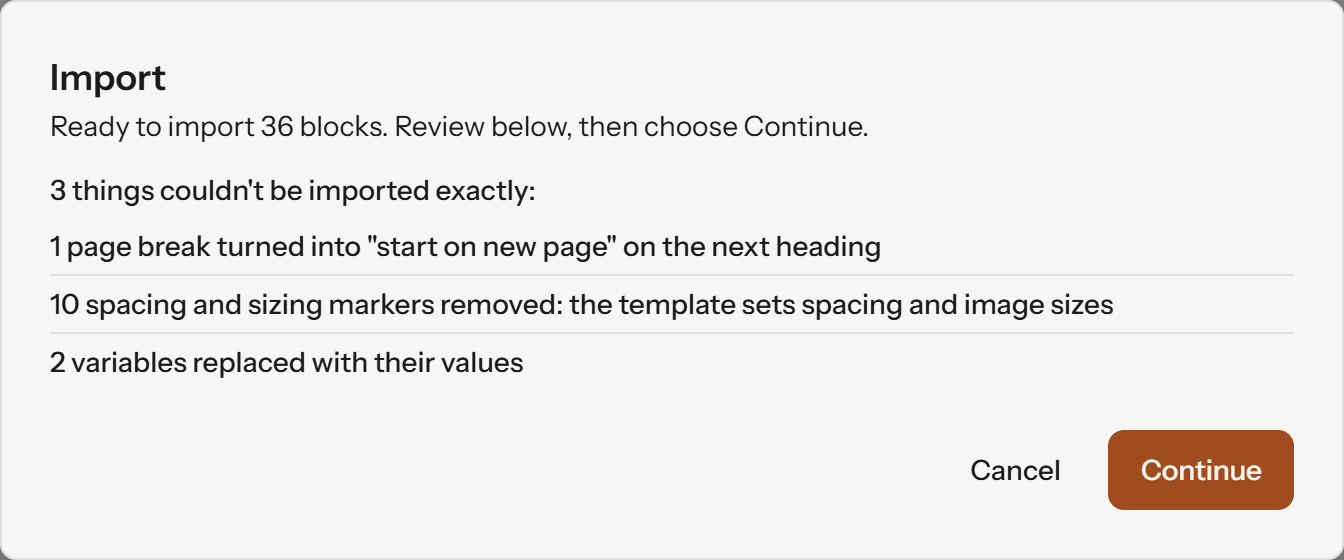
The import report lists everything it changed:
- The
\pagebreak became a "start on new page" setting on the heading after it. - Homebrewery's spacing markers were removed, because RuleBindery's template sets spacing.
- The two variables were replaced with their values: the stat block reads 27 hit points, and the pack total on the next page reads 81. RuleBindery does not use Homebrewery's variable syntax. A value you want to reuse belongs in a library entry, and every page that uses the entry shows its current version.
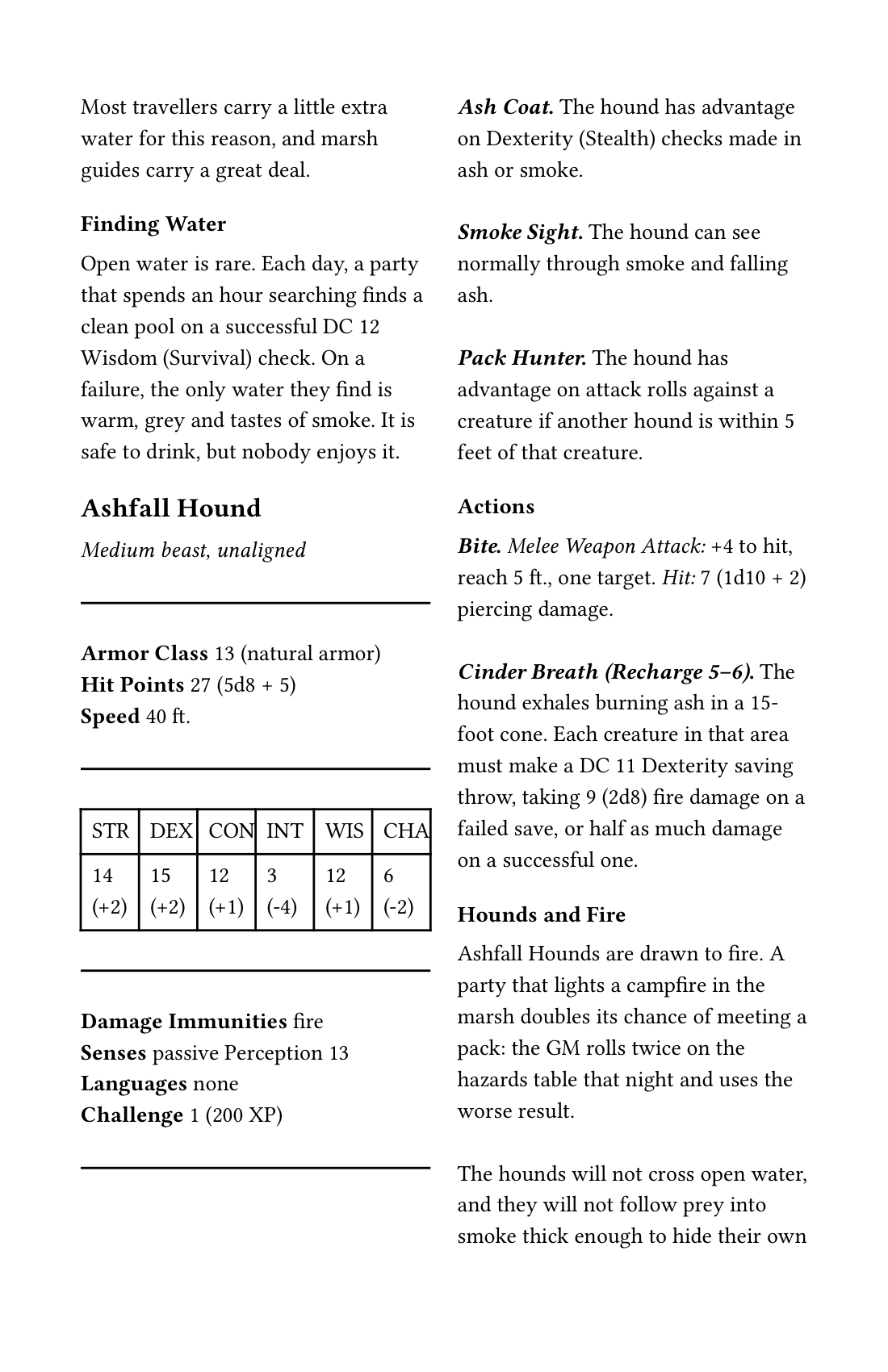
In the screen PDF, every word of the brew is there, and the "Taming a Hound" section that was cut off in The Homebrewery starts at the top of the next page.
The same structure covers the other signs above. The import offers to turn sections into library entries, and you choose which. Edit an entry once and every page that uses it follows, as our stat block guide shows. On the paid plan, the book also exports as an HTML SRD, and errata are built from the changes between two saved snapshots, as shown in what happens when a rule changes.
What you give up: RuleBindery does not recreate The Homebrewery's parchment look, as the image shows. You cannot place things by hand, it needs a connection, and it is built for game books rather than general design work. Writing, the editor and the validator are free. Importing and the screen PDF are on the paid plan; current prices are on the pricing page.
Frequently asked questions
What is a GM binder?
GM Binder is a web app for writing tabletop RPG documents in Markdown, with a live preview that looks like fifth edition D&D books. The free Basic plan covers writing and sharing. GM Binder Plus, at USD 60 a year or USD 6.00 a month, adds variables, themes, bookmarks and PDFs without its credits page.
Is GM Binder trustworthy?
GM Binder has been running for years and was funded on Kickstarter in 2019. Its terms say it claims no ownership of what you write, and that the service is provided "as is" and can be changed or discontinued. That is normal for a web app. Keep your own copy of your Markdown, whichever tool you use.
Is The Homebrewery free?
Yes. The Homebrewery has no paid tier and no ads, and its welcome page says it never will. It is run by volunteers and funded by donations.
Can I use The Homebrewery without an account?
Yes, for writing. The editor at its "new" page works without signing in, but you need an account to save a brew. Until then the work lives only in your browser, and the site warns you if it has never been saved.
Can I sell something I made with Homebrewery or GM Binder?
Neither tool stops you, and GM Binder's terms say you keep ownership of your content. The Homebrewery's welcome page puts the responsibility on you to hold the rights to any images or other material you use. If your book uses another game's rules, that game's licence applies too. This is general information, not legal advice.